
One database for every register in your store
OTPOS Retail Pro is everything in the free OTPOS Retail, plus a shared MySQL network database. Tills, back office and stockroom PC see the same products, stock, members, sales and staff — the moment they change.
- No credit card
- No account
- Keeps your free-edition data
One server, every register in sync
One always-on computer runs the database. Every register connects to it over your store network — no cloud, no monthly hosting.
Install the server
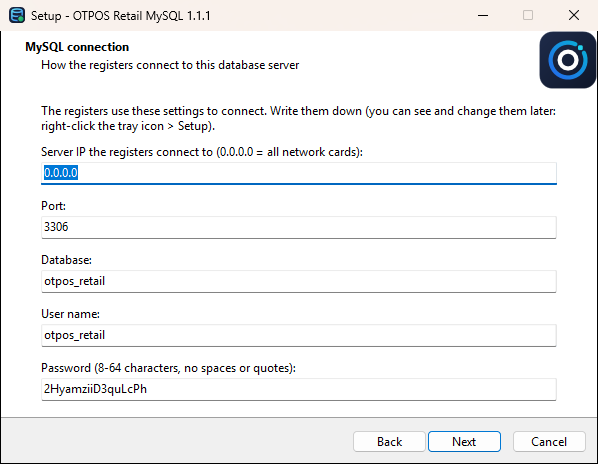
Run the OTPOS Retail MySQL setup on one always-on PC. It installs MySQL 5.7 as a Windows service, creates the database, opens the firewall and schedules a nightly backup.
Download MySQL serverConnect the first register
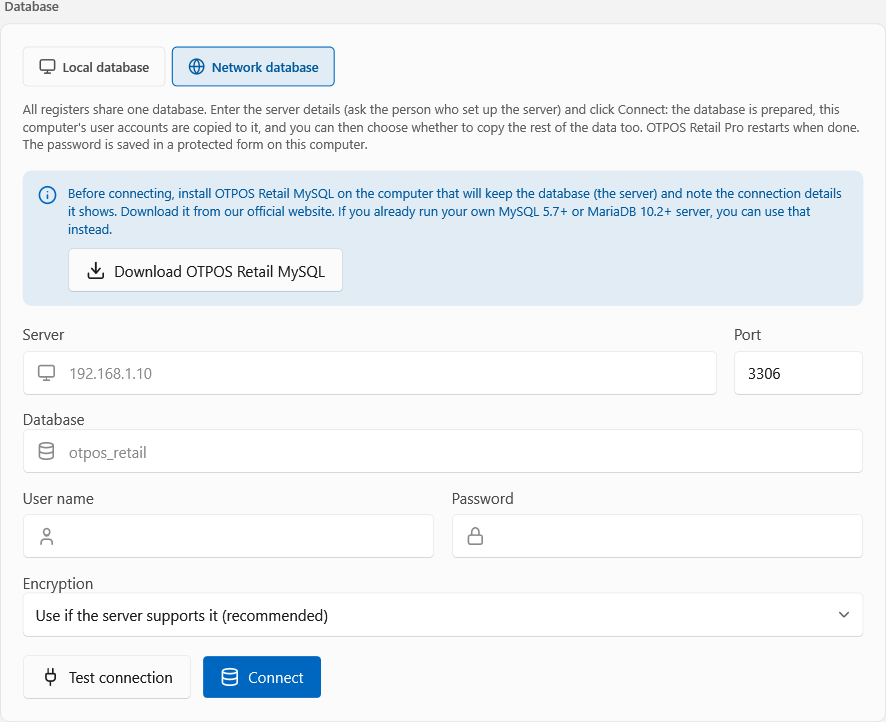
In Settings → Network data, enter the server details and click Connect. Products, sales, members, shifts and stock history are copied to the server.
Download OTPOS Retail ProConnect the others
Enter the same details on every other register. They restart on the shared data, and staff sign in with the same accounts and PINs.
Read the guideBuilt for stores with more than one till
The business data is shared; the hardware setup stays with each register.
Shared by every register
Change it on one till, see it on all of them
- Products, prices & stock — sales on every till count down the same stock, so low-stock alerts are right
- Sales & reports — whole-store gross profit, cashiers and voids, from any register or the back office
- Members & points — earned at one till, spent at another
- Staff, PINs & roles — one set of accounts for the whole store
- Store settings — tax rates, receipt text, promotions; order numbers unique across tills
Kept on each register
So tills with different hardware work side by side
- Shift & cash drawer — own opening float, count and X/Z reports, so over/short is per drawer
- Receipt printer & cash drawer — 58 or 80 mm, USB or network
- Scale & customer display
- Language & theme — English, Français, Español or 中文, light or dark
- Connection details — password stored encrypted with Windows DPAPI
Nightly backups
The server exports the whole database every night at 02:30 to OneDrive and keeps 14. Back up or restore any time from the tray.
Nothing lost when you switch
Connecting never changes the local database. If anything fails, the register keeps working on its own data.
Your own server works too
Already run MySQL 5.7.9+ or MariaDB 10.2.2+ on a NAS or Linux box? Point the registers at it instead.
Set up in minutes, managed from the tray
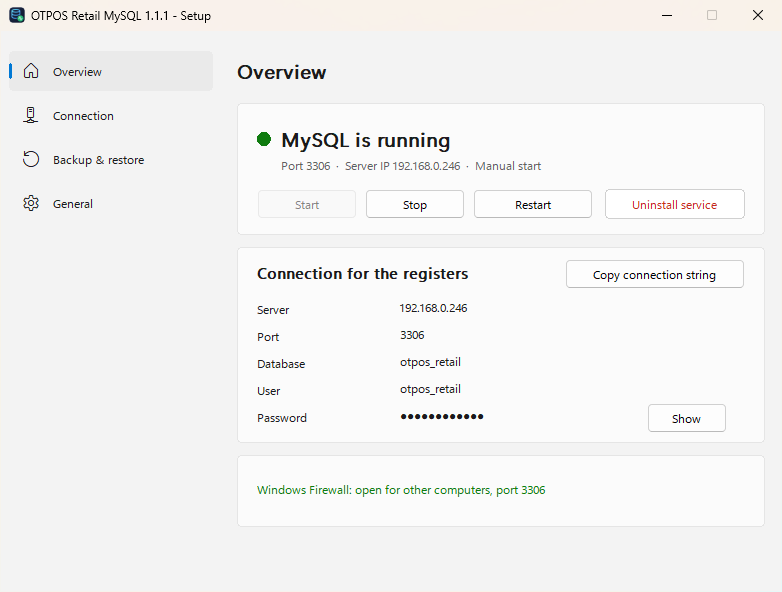
Click any screenshot to see the whole window.
 Full window
 Full window
Full window
Full window
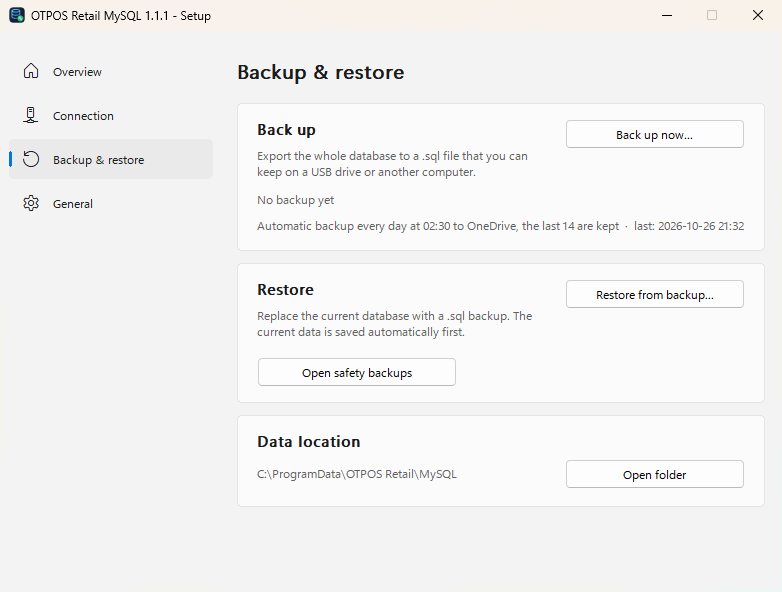 Full window
Same register, one extra switch
Every selling feature is in both editions. Pro adds the shared network database.
For a store with one register
- Checkout, payments, hold & recall
- Shifts, cash drawer, X/Z reports
- Inventory, promotions, labels, members
- Reports with CSV export
- Local database with daily backup
- Windows 10 / 11, 32 & 64-bit
Then one licence per register
- Everything in the free edition
- Shared MySQL / MariaDB database
- Whole-store reports across registers
- Server package with nightly backups
- Local database stays free to use
- Windows 10 / 11, 64-bit
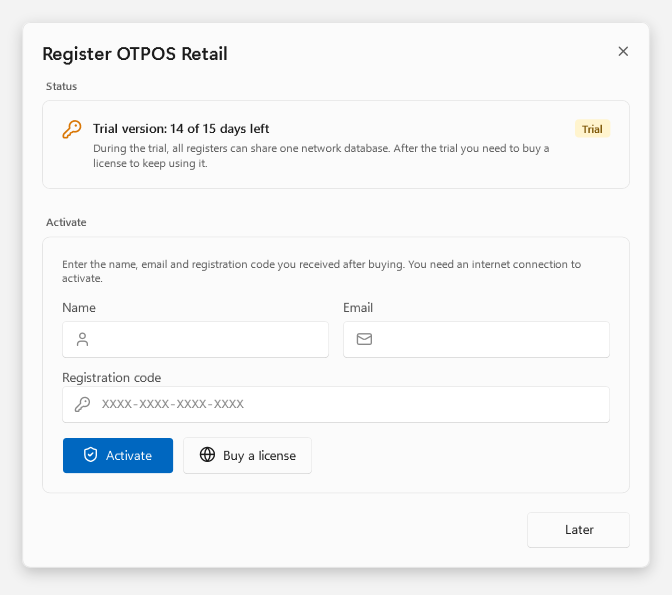 Full window
How the trial and licence work
- The 15-day trial starts on each register the first time it connects to a database server.
- After the trial, activate with the name, email and registration code you receive after buying.
- When a trial ends, the data on the server is kept — nothing is lost.
- A licence belongs to one computer; remove it there first to move it.
Questions first? Contact us.
Download OTPOS Retail Pro
Two installers: the server package on one computer, Pro on every register. Each register gets a 15-day free trial of the network database.
OTPOS Retail Pro
v1.2.1The POS app. Includes every feature of the free edition; installing over it keeps your data.
Download OTPOS Retail ProOTPOS-Retail-Pro-1.2.1-x64-Setup.exe · Windows 10 / 11 x64
OTPOS Retail MySQL
v1.1.1The database server. Sets up MySQL 5.7 as a Windows service, the firewall rule and a nightly backup.
Download OTPOS Retail MySQLOTPOS-Retail-MySQL-1.1.1-x64-Setup.exe · Windows 10 / 11 x64
Only one register? Pro works on its own local database like the free edition — you don’t need the server package. Using your own MySQL or MariaDB? See the guide.
Back up the register that holds your current data first. Step by step: network database guide.
Frequently Asked Questions
Selling, shifts and reports work as in the user manual. Server setup is in the network database guide.
Q.01What is the difference between OTPOS Retail and OTPOS Retail Pro?
Pro has every feature of the free OTPOS Retail and adds one thing: several registers can share one MySQL or MariaDB network database, so products, stock, members, sales, shifts and staff accounts are the same on every till. On a single register with its local database, Pro works exactly like the free edition.
Q.02Can I upgrade from the free edition without losing data?
Yes. Install Pro over the free edition and your local data is kept. When you connect the first register to the network database, it offers to copy its products, sales, members, shifts and stock history to the server. The local database itself is never changed.
Q.03How does the trial and licence work?
Each register gets a 15-day trial that starts the first time it connects to a database server. After the trial, that register needs a licence to keep connecting; the data on the server is kept. A licence belongs to one computer and can be moved by removing it first. Using the local database is always free.
Q.04Do I need a dedicated server?
No. Any 64-bit Windows 10 or 11 computer that stays on while the store is open will do, including one of the registers or a back-office PC. Give it a fixed IP address on your store network.
Q.05Can I use my own MySQL or MariaDB server?
Yes. MySQL 5.7.9 or later or MariaDB 10.2.2 or later with InnoDB works, for example on a NAS or a Linux machine. Create an empty utf8mb4 database and a user with full rights on it. Backups of your own server are your responsibility.
Q.06What happens if the server is down?
A register that cannot reach the server asks whether to try again, exit, or use its own local database in an emergency. Sales made locally are not on the server, so keep the server computer on and its MySQL service set to start with Windows.
Q.07Does it need the internet?
Not for selling: registers only need the store network and the server. The internet is used to activate the licence and, optionally, to keep the nightly backups in OneDrive.
Documentation & support
Network Database Guide
Installing the MySQL server, connecting the registers, backups, licence and troubleshooting
User Manual
Selling, shifts, refunds, products, inventory, reports and settings — the same in Pro
Support
Help with setting up the server and licences, Mon–Fri, 9 AM–6 PM MT
Run every till on one shared database
Install the MySQL server on one PC, OTPOS Retail Pro on your registers, and connect them in a few minutes.
Shared stock • Whole-store reports • Nightly backups • Works without internet