
OTPOS Retail: free POS software for convenience stores
A cash register program for convenience stores, grocery stores, cafés and bakeries. It runs on an ordinary Windows PC or an all-in-one touch-screen register, works completely offline, and drives your barcode scanner, receipt printer and cash drawer.
Free download, free upgrades to every new version. No licence fee, no monthly subscription, no account to create. Your data stays on your own computer.
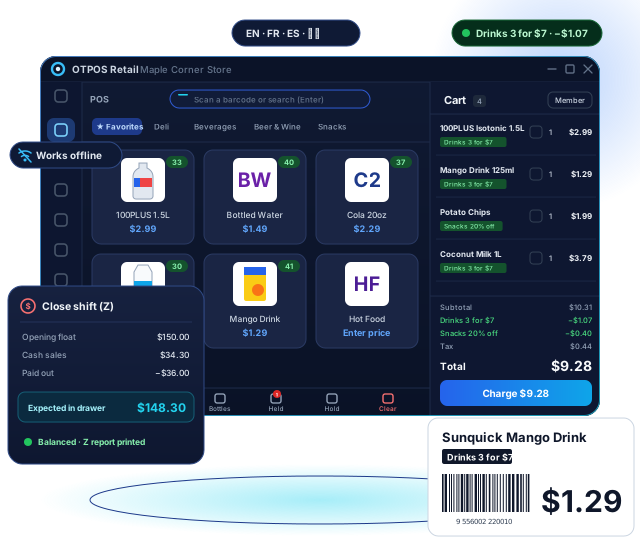
Everything a cash register does, and more
Scanning, quantity keys, department keys, price changes, the cash drawer, opening float, pay-ins and pay-outs, X/Z reports — plus product stock, members and reports a cash register can’t give you.
Pair it with our receipt printers and POS terminals, or use the hardware you already have.
Fast checkout
Scan any time without clicking the search box, type 3* + scan for quantities, favourites as quick keys, open-price and sold-by-weight items, hold and recall sales, and split payments.
Shifts & cash drawer
Opening float, pay in / pay out with reasons, X report mid-shift and a Z report at close. Cashiers count blind; managers see over/short.
Inventory & labels
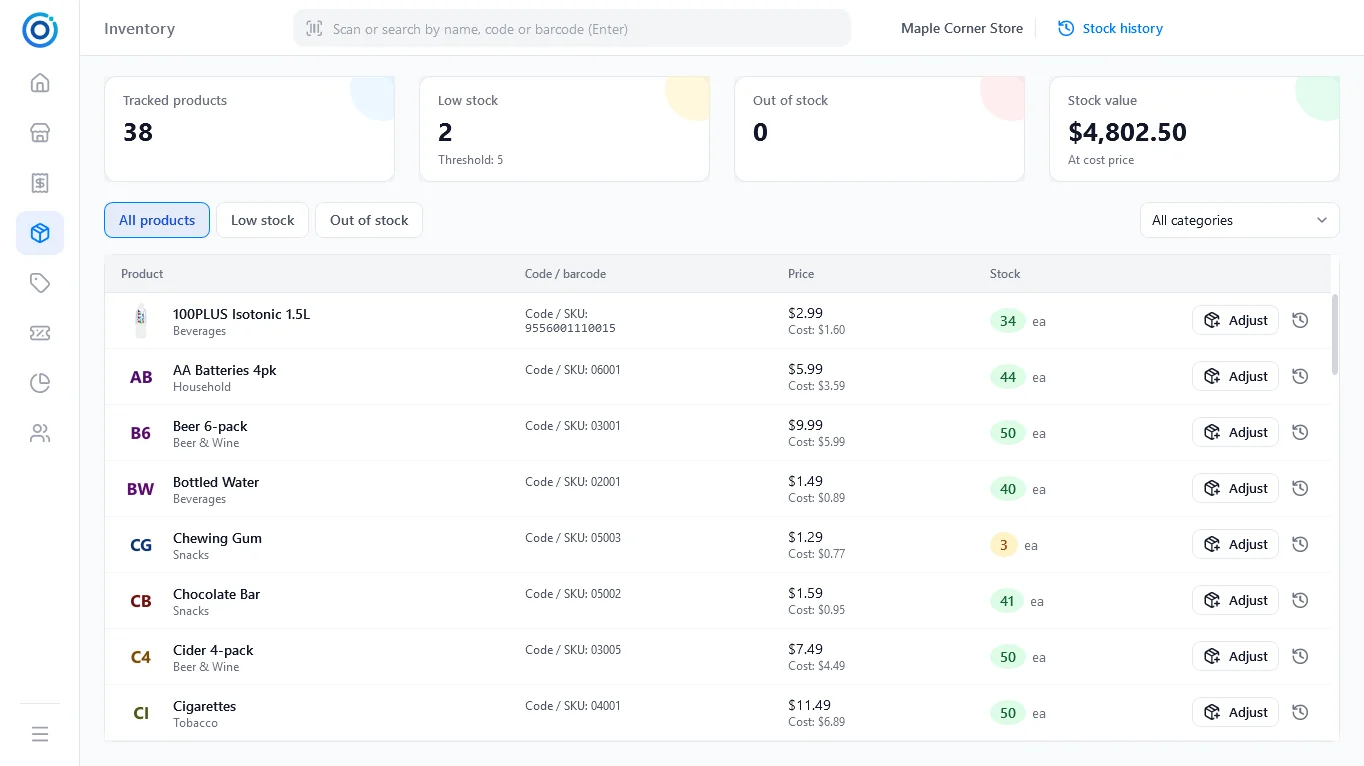
Stock goes down with every sale. Receive, remove and count stock with a full history, get low-stock alerts, import/export products as CSV and print shelf labels and barcode stickers.
Reports
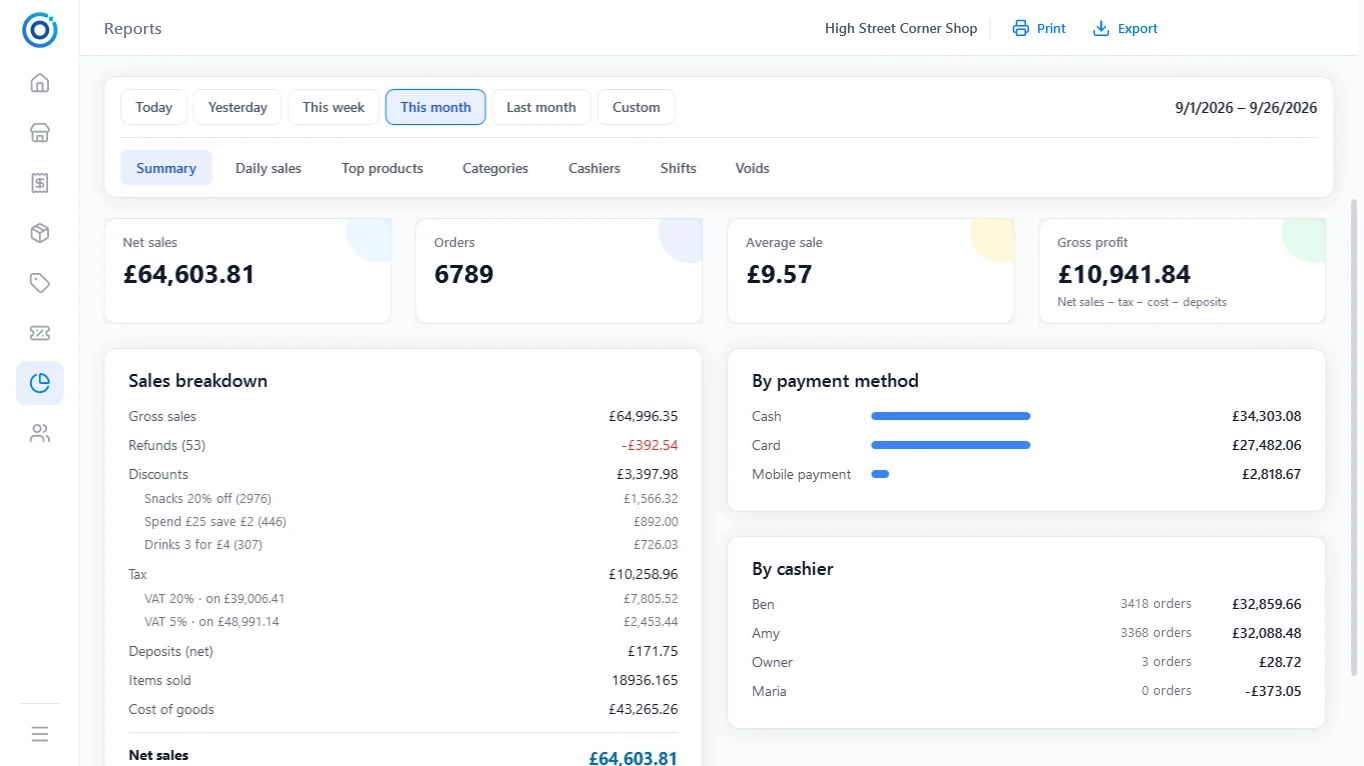
Summary with gross profit and tax per rate, daily sales, top products, categories, cashiers, shifts and voids. Export any report to CSV or print it on the receipt printer.
Made for convenience and grocery stores
The details small shops in Canada, the US, the UK and Europe deal with every day
Age-restricted items
Alcohol and tobacco prompt the cashier to check ID and show the latest date of birth allowed (16, 18, 19 or 21).
Bottle deposits
Deposits are added automatically and never discounted. A Bottles key refunds returned empties, even with no purchase.
Automatic promotions
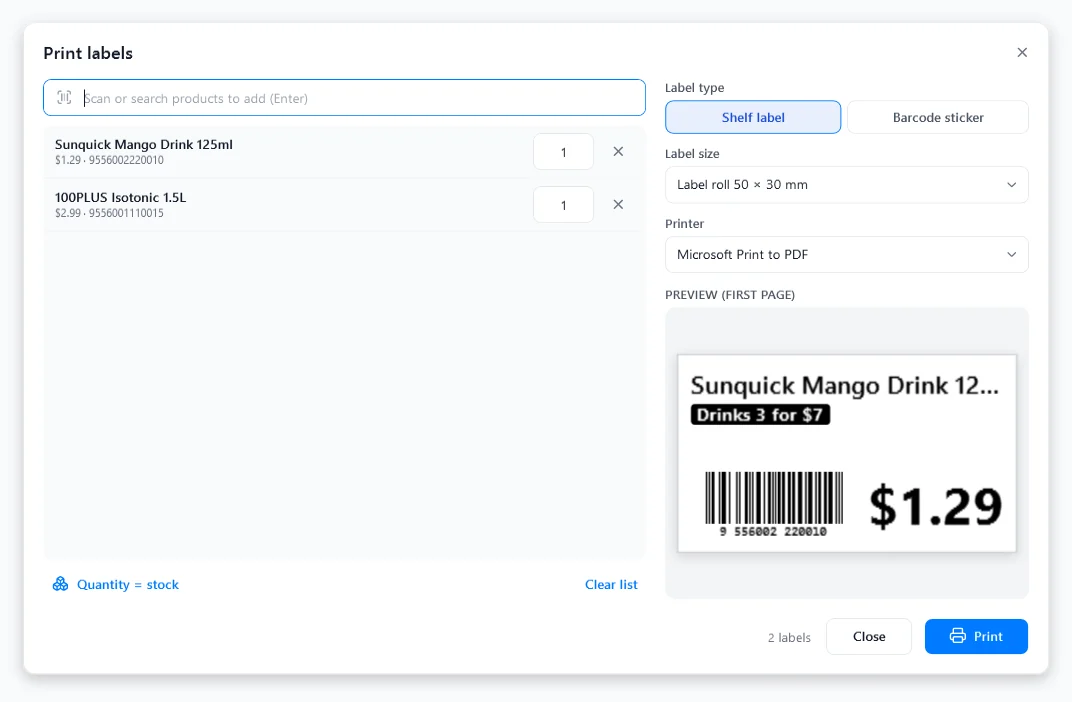
Multi-buy (3 for $7), second item discounted, percent off and spend thresholds, by category or product, with start and end dates.
Taxes & cash rounding
Presets for 20 countries, tax added at checkout or included in prices, several rates per product, and cash rounding to $0.05 for Canada.
Loyalty members
Attach a member by name, phone, email or code; points are earned on every purchase and taken back on refunds.
Staff, PINs & loss prevention
Cashier, manager and admin roles. Lock the till and switch cashiers with a PIN. Every removed item or cleared cart lands in the voids report.
See it in action
Click any screenshot to see the whole screen.
 Full screen
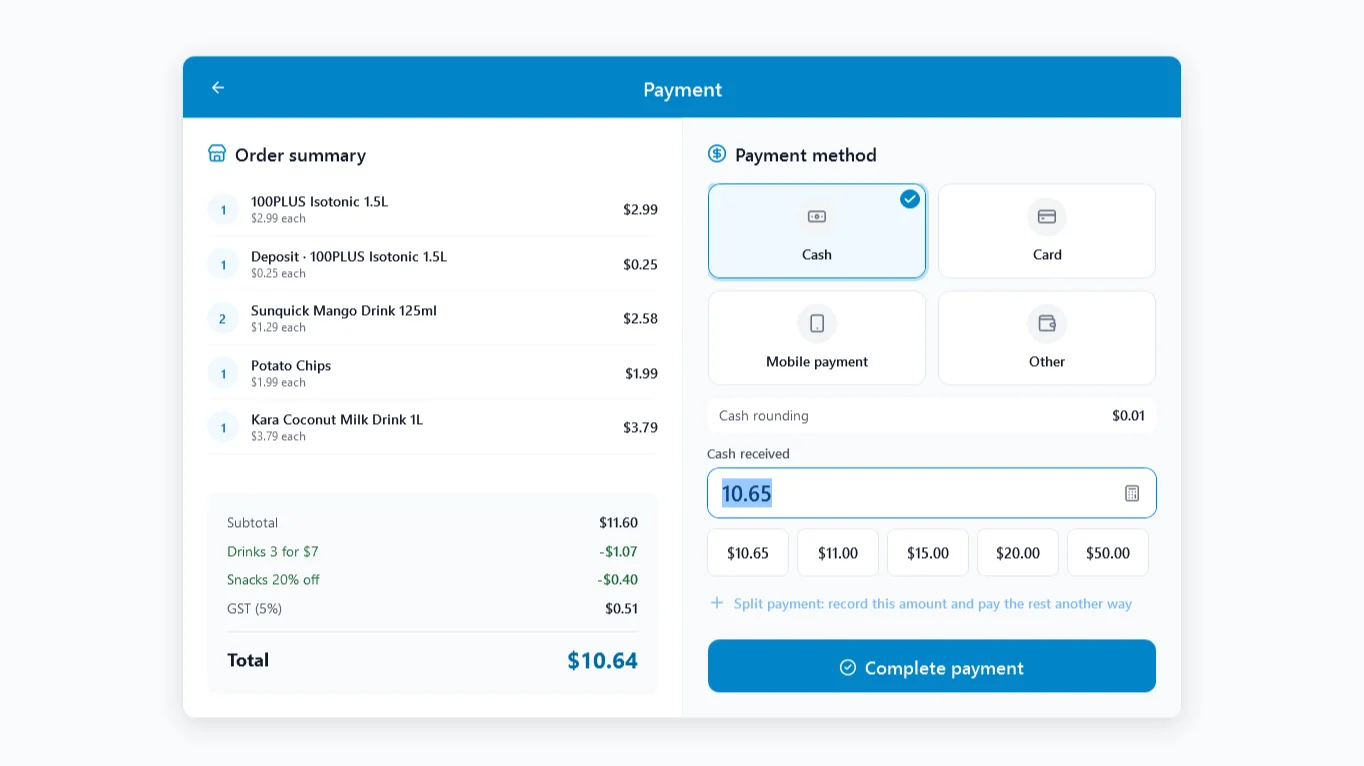
Payment
Cash, card, mobile or custom methods, quick amounts, split payment and cash rounding.
Full screen
Payment
Cash, card, mobile or custom methods, quick amounts, split payment and cash rounding.
 Full screen
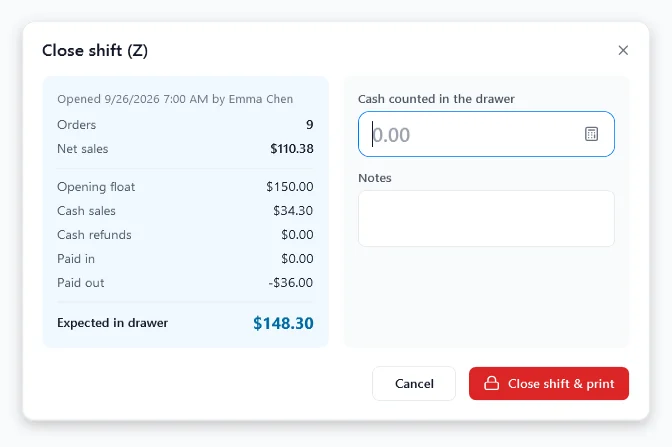
Close shift (Z)
Count the drawer blind; managers see expected cash and over/short.
Full screen
Close shift (Z)
Count the drawer blind; managers see expected cash and over/short.
 Full screen
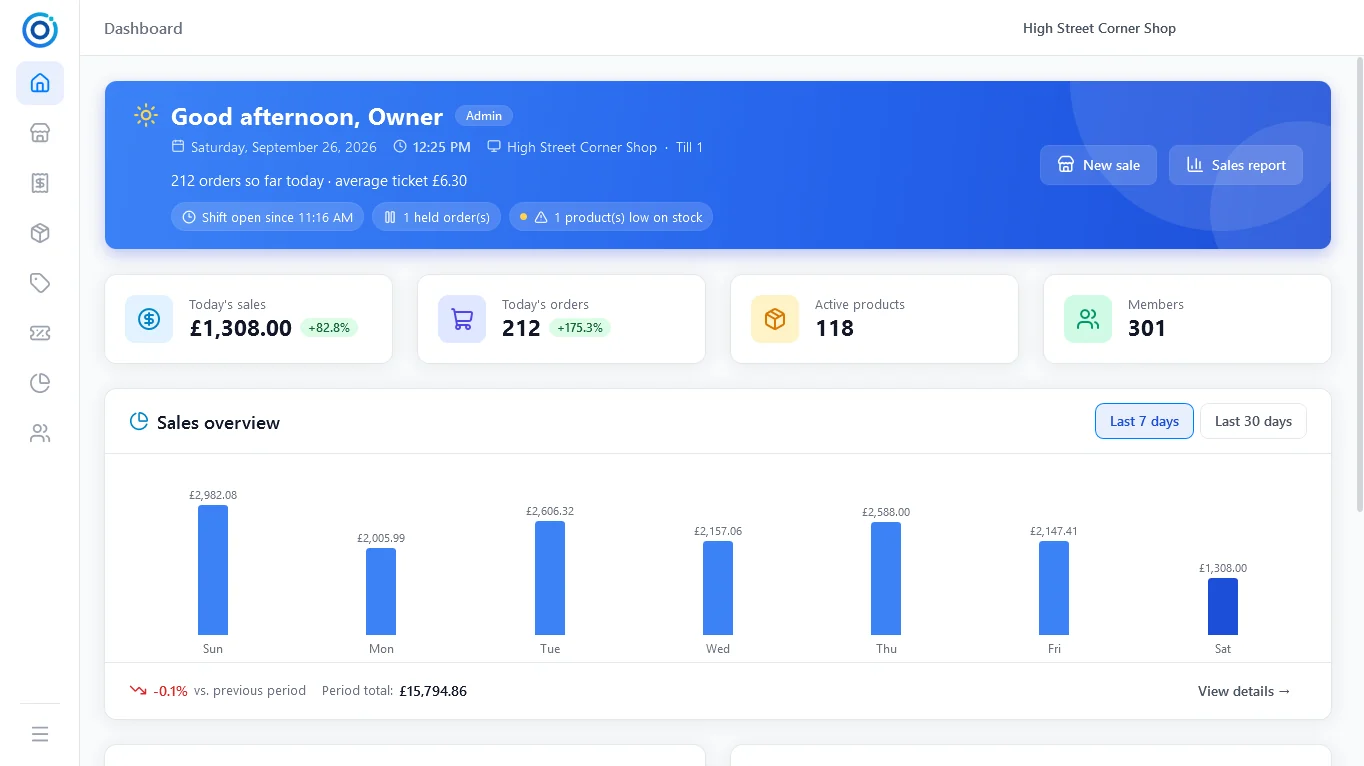
Dashboard
Today compared with yesterday at the same time, open shift, held orders and low stock.
Full screen
Dashboard
Today compared with yesterday at the same time, open shift, held orders and low stock.
 Full screen
Inventory
Low-stock and out-of-stock filters, stock value at cost and one-tap adjustments.
Full screen
Inventory
Low-stock and out-of-stock filters, stock value at cost and one-tap adjustments.
 Full screen
Shelf labels
Shelf labels and barcode stickers with the current promotion, on rolls or A4 / Letter.
Full screen
Shelf labels
Shelf labels and barcode stickers with the current promotion, on rolls or A4 / Letter.
 Full screen
Reports
Gross profit, every promotion, tax per rate, payment methods and cashiers.
Full screen
Reports
Gross profit, every promotion, tax per rate, payment methods and cashiers.
Download OTPOS Retail for Windows
Version 1.1 is a free download for 64-bit and 32-bit Windows, and future versions are free upgrades.
Windows 64-bit (x64)
For most PCs and all-in-one POS terminals running 64-bit Windows.
OTPOS-Retail-1.1-x64-Setup.exe
Windows 32-bit (x86)
For older registers running 32-bit Windows.
OTPOS-Retail-1.1-x86-Setup.exe
Not sure which one you need? In Windows open Settings → System → About and look at System type. OTPOS Retail is Windows-only; there is no Android, macOS or Linux version.
System Requirements
| Windows | Windows 7 SP1 or later; Windows 10 / 11 recommended |
| Runtime | .NET Framework 4.6.2 or later (built into Windows 10 / 11; the installer tells you if it is missing) |
| Screen | 1024 × 640 minimum; 1366 × 768 or larger for touch screens |
| Internet | Not needed — the program works completely offline |
| Data | Stored on this PC in %LocalAppData%\OTPOS Retail, with a daily automatic backup |
Works with standard POS hardware
No drivers to configure for the scanner, and no special cash drawer interface.
| Device | How it connects |
|---|---|
| Barcode scanner | Any USB scanner in keyboard mode — plug in and scan |
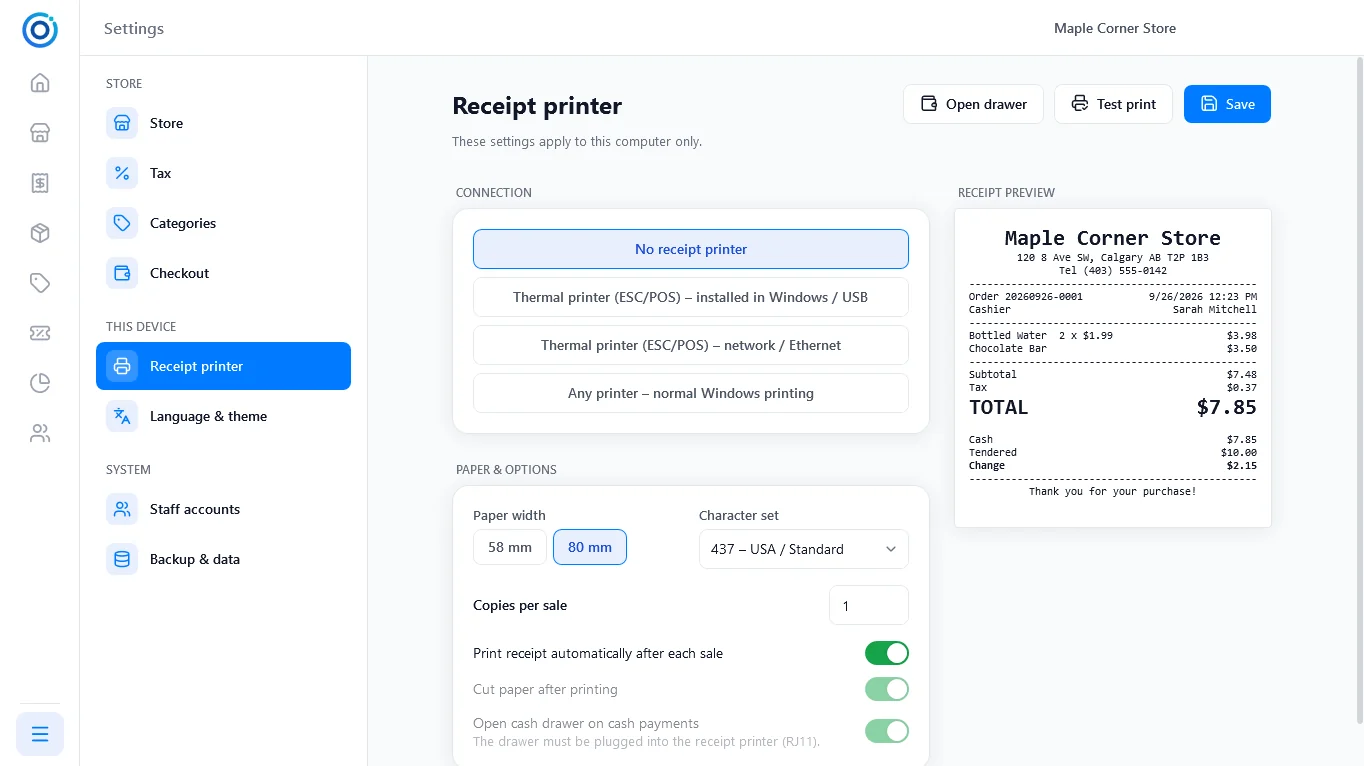
| Receipt printer | ESC/POS thermal printer, 58 mm or 80 mm, on USB or the network (port 9100); any Windows printer also works |
| Cash drawer | Plugged into the receipt printer (RJ11); opens automatically for cash payments |
| Label printer | Any label printer with a Windows driver (Zebra, DYMO, Brother, TSC …) or A4 / Letter label sheets |
| Scale | Enter the weight, or scan the price/weight labels your scale prints |
| Card terminal | Stand-alone: take the card payment on the terminal, OTPOS records the method and reference |
 Full screen
Is OTPOS Retail really free?
Yes. OTPOS Retail is free to download and free to use in your store, with no licence fee, no subscription and no monthly fee, and you don’t need to create an account. You only pay for any hardware you choose to buy.
Are upgrades free too?
Yes. Every new version of OTPOS Retail is a free upgrade. Install it over the old version: your products, sales, staff and settings are kept and the database is updated automatically on first start.
Which operating systems are supported?
Windows only: Windows 7 SP1 through Windows 11, with separate 64-bit and 32-bit installers. There is no Android, macOS or Linux version.
Does it need the internet?
No. OTPOS Retail stores everything in a local database on the register and never sends your business data anywhere. It backs up automatically every day; copy a backup to a USB stick regularly.
How long does setup take?
A four-step wizard asks for your country, store details and owner account, and can add sample products for a convenience store, grocery, café or bakery. Currency, tax and cash rounding are filled in from your country. You can be ringing up sales within minutes, then import your own products from a CSV file.
Does it handle Canadian GST, PST and HST?
Yes. Choosing Canada sets CAD, GST 5% added at checkout and cash rounding to $0.05. Add your province’s PST or use the HST rate in Settings → Tax, and set tax-exempt items per product.
Can I use it in more than one store or on several registers?
Version 1.1 is designed for one store, with each register keeping its own shifts and data. Shared databases for several registers are not officially supported yet.
Which languages are available?
English, French, Spanish and Simplified Chinese, with light and dark themes. The language is picked from Windows on first start and can be changed any time.
Documentation & support
User Manual
Installing, setup, selling, shifts, refunds, products, reports and settings, with screenshots
Receipt Printers
ESC/POS thermal printers with a cash drawer port, from Canadian stock
Get Support
Email our Calgary team for help with installation and setup, Mon–Fri, 9 AM–6 PM MT
Replace your cash register with free POS software
Install OTPOS Retail on a Windows PC, then add the scanner, receipt printer and cash drawer you need from our Canadian stock.
Free download • Free upgrades • No monthly fees • Works offline • No registration